
Register at Luks Casino: Open Your Account in a Few Steps
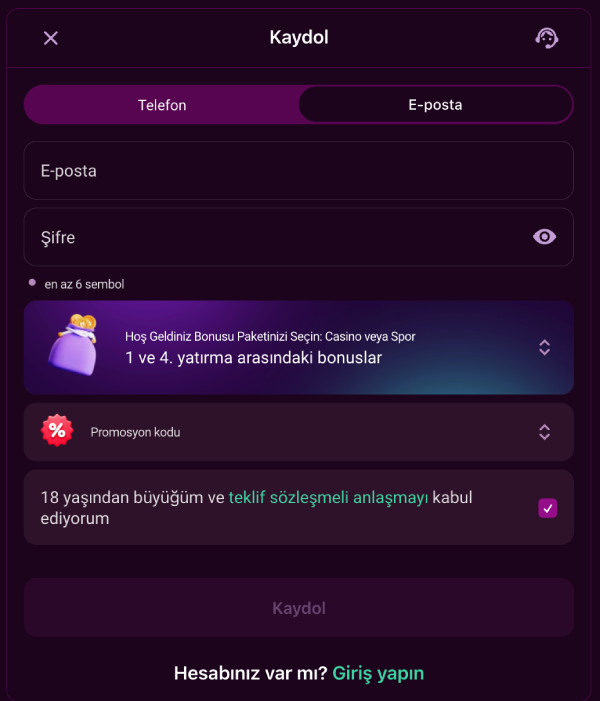
Opening an account at Luks Casino takes just a few minutes. Fill in the registration form with your phone number or email, pick your welcome package, and start using your account right away.
Benefits of Registering
- Fast sign-up: create your account in a few steps using your phone or email.
- Option to select a welcome package during registration.
- A registration form that respects the protection of your personal data.
- A single user profile for accessing your account after registration.
Step-by-Step Registration Instructions
- Open the registration form.
- Choose your registration method: Phone or Email.
- Enter your contact information (for phone, the default country code is +90, format: +90(XXX) XXX-XXXX).
- Create a password of at least 6 characters.
- Optionally select the Casino Package, Sports Package, or no bonus; if you have a promo code, you can enter it in the corresponding field (optional).
- Check the box confirming you are 18 or older and accepting the Offer Agreement.
- Confirm to complete your registration.
Only one account per user is permitted; opening multiple accounts is not allowed. Transferring funds between accounts is prohibited, and transfers from third parties are not accepted either. The IP address and browser data you register with are logged automatically to protect your account. Your registration form and account data are protected with 256-bit SSL encryption.
Sign-In Methods and Password Recovery
Once you're registered, you can sign in three ways; the table below shows what each method requires.
| Sign-In Method | Required Info |
|---|---|
| Phone | Phone number + password |
| Email address + password | |
| Account ID | Account ID number + password |
If you forget your password, use the "Forgot your password?" link on the sign-in page. Password recovery only works if the phone number or email on file is still current, so keep your contact details up to date.
Welcome Package Options
The registration form offers the Casino Package, the Sports Package, or no bonus at all. The table compares the two packages' first-deposit structure.
| Package | Total Rate | Deposits | First-Deposit Bonus | Max. Bonus (1st Deposit) |
|---|---|---|---|---|
| Casino Package | 450% + 340 FS | 4 deposits | 150% + 70 FS (Gates of Olympus 1000) | 10,000 TRY |
| Sports Package | 450% + 325 TL FreeBet | 4 deposits | 150% + 50 TL FreeBet | Shown in your account panel |
The free spins for the following deposits of the Casino Package break down like this:
- 2nd deposit: 100% + 80 FS (Sugar Rush).
- 3rd deposit: 100% + 90 FS (Sweet Bonanza).
- 4th deposit: 100% + 100 FS (Big Bass Bonanza).
Make your first deposit within 5 days of registering. The bonus wagering requirement is x35, and playthrough must be completed within 5 days of the bonus being credited; if the bonus balance drops to 1 TRY, wagering progress resets. To claim the 2nd, 3rd or 4th deposit bonus, activate the offer separately in the Bonuses section. If you have a promo code, enter it in the form — the field is optional and can stay blank. The Sports Package's wagering requirement and betting limits are listed under the package description in the form itself.
Account Verification and KYC
Account verification is handled by a third-party provider, KYCAID. During the KYC verification, you'll be asked to choose one of the following document types:
- ID card
- Passport
- Driver's license
You also have the option to continue the verification process on your phone. The platform reserves the right to check your age, country of residence and current location, and this check can happen at any stage after registration. KYC protects your account and supports the reliability of the platform.
Steps to Complete Before Withdrawing
Before your first withdrawal request, three steps need to be completed on your account.
- Confirm your phone number.
- Confirm your email address.
- Make your first deposit with real money.
A withdrawal cannot be started until all three steps are done. Withdrawals are processed through the same method used for the deposit.
Common Situations
- Forgot your password? Use the "Forgot your password?" link on the sign-in page.
- No promo code? Complete the form without one; you can register without a bonus and without picking a package.
- After registering, sign in with your phone number, email, or account ID.
- Current promo codes are shared on the brand's Telegram channel. Even if you didn't enter one at registration, you can still use it from the bonuses section afterward.
Once you confirm your phone and email, you may become eligible for extra rewards tied to seasonal campaigns; current conditions and reward amounts are shown in your account panel.
Registering and Accessing the App on Mobile
The registration form works the same way in a mobile browser. The app isn't officially listed on the App Store or Google Play, which is why Android uses APK download and iOS uses the PWA method. Once your account is open, use the following steps for mobile access.
- Android: scan the QR code on the download page, tap "Open," grant the required installation permissions, then tap "Install" to finish.
- iOS: in Safari, tap the "Share" icon at the bottom of the screen, select "Add to Home Screen," then confirm with "Add."
Both methods use the same registration and sign-in details; you don't need a separate account for mobile.
FAQ
Which methods can I use to register?
You can register with your phone number or your email address; both methods proceed through the same registration form.
Is entering a promo code required during registration?
No, the promo code field is optional; you can continue with a welcome package selection or without any bonus.
What should I do after registering?
Learn how to sign in to your account after registration, and take advantage of the trial bonus.