
Installing on Android and iOS
If you're looking for the Luks Casino download, you're in the right place. On our platform, we bring casino games and sports betting together under a single account through a dedicated mobile experience. We want to be upfront: our app does not have an official listing on Google Play or the Apple App Store. You can complete the download by scanning the QR code available on the site (Android) or by adding a web app through Safari (iOS). Our mobile casino is built to work smoothly across modern Android and iOS smartphones, using the same account as the desktop version.
Access and Compatibility Details
Before you start the installation, the table below summarizes how mobile access works.
| Feature | Description |
|---|---|
| Access type | Android: file download via QR code; iOS: Safari PWA (web app shortcut) |
| Store status | No official listing on Google Play or the App Store |
| Compatibility | Modern Android and iOS smartphones |
| Usage | Accessible from your mobile device via browser or home screen shortcut |
| File size | The Android app file is roughly 43 MB |
You can sign in on your mobile device with your phone number, email address, or account ID. If you forget your password, use the reset link on the login page to start recovery.
What Can You Reach From the Mobile Version?
From your mobile browser or the installed app, you reach the casino lobby, live casino tables, instant games and the slot library at the same scope as on desktop. Sports betting is available through the same account from your mobile device as well. You don't need a separate app for each category — everything sits behind the same interface.
- Casino Lobby: the main hub for featured and popular titles.
- Live Casino tables: table games played with real dealers.
- Instant Games: fast-resolving crash-style games.
- Slot games: a slot library spanning a wide range of providers.
- Sports betting: football, basketball, tennis, table tennis, volleyball, handball, esports (CS, League of Legends), hockey and UFC.
Our slot library includes titles from more than 50 game providers, and you can browse the slot collection from your mobile device too. You can also join live casino tables from mobile using the same account.
How to Install on Android
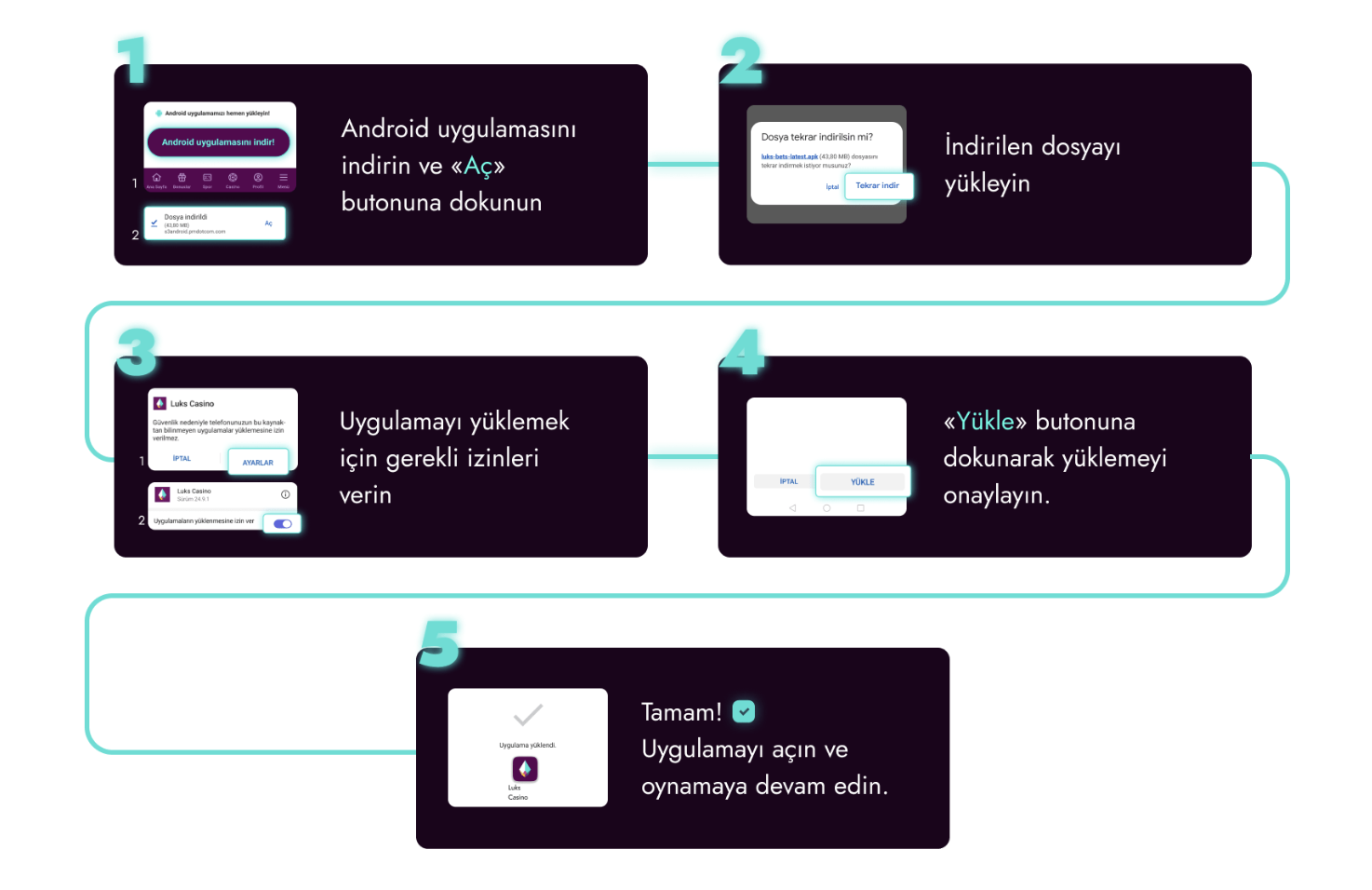
To install our mobile app on your Android device, follow these steps:
- Download the Android app file by scanning the QR code available on the site, then tap "Open".
- Download the file again if needed.
- Grant the installation permissions requested by your device.
- Tap "Install" to complete the setup.
- Open the app and start playing.
The permissions your device requests during installation are the standard permissions needed to install the app on your phone.
How to Install on iOS
For iPhone users, installation works as a web app added through Safari:
- Tap the "Share" button at the bottom of Safari.
- Select "Add to Home Screen" from the menu.
- Tap "Add" to confirm.
- The "Luks Casino" icon will appear on your home screen as a web shortcut.
"Add to Home Screen" is only available in Safari. If you opened the page in a different browser, repeat the same steps in Safari instead.
Mobile-Exclusive Offers
In the past, app-exclusive campaigns have also run for a limited time; for example, a seasonal promotion once offered 77 free spins on Gates of Olympus only through the mobile app. The same reward has also appeared through the periodic "YAZ SAHİLİ" (Summer Beach) campaign, tied to confirming your phone and email. Offers like this are tied to specific campaigns and should not be viewed as a standing benefit.
Once you're signed in on mobile, the same account also gives you access to ongoing gamification features:
- Earn Rewards hub: complete daily missions to earn rewards.
- Daily Champion: a competition based on a daily leaderboard.
- Lucky Loto 55: a countdown-based draw you can enter.
- VIP deposit cashback: a tiered cashback offered through the VIP program.
These features work the same way on mobile and desktop; your progress is tracked on the same account regardless of which device you use. You can follow our Telegram channel for current promo codes and enter a code in the promo code field on the registration form from your mobile device. If you want a no-deposit trial bonus, you can also complete phone and email verification from your mobile device.
Depositing and Verifying Your Account on Mobile
When topping up your balance from your mobile device, you can choose from 6 bank transfer methods and 8 crypto methods; the minimum deposit varies by method. Deposits made with crypto methods are credited to your account instantly.
| Method | Type | Minimum deposit |
|---|---|---|
| Havale IBAN (FinPay Hızlı Havale) | Bank transfer | 2000₺ |
| Havale IBAN (Mega Havale) | Bank transfer | 750₺ |
| Mpay Fast Banka IBAN | Bank transfer | 500₺ |
| Havale | Bank transfer | 500₺ |
| Mpay Havale IBAN | Bank transfer | 2000₺ |
| TrinkPara Havale IBAN | Bank transfer | 1000₺ |
| TRON (TRX) | Crypto | 300₺ |
| USDT TRC20 | Crypto | 300₺ |
| USDT ERC20 | Crypto | 300₺ |
| Bitcoin | Crypto | 900₺ |
| Ethereum | Crypto | 300₺ |
| Litecoin | Crypto | 300₺ |
| USDC (ERC-20) | Crypto | 300₺ |
| Binance Pay | Crypto | 100₺ |
There's no direct card payment option with a debit or credit card. Deposits can be made by bank transfer or crypto. Check the withdrawal conditions for more detail. Transactions from your mobile device are protected with 256-bit SSL encryption. When depositing by bank transfer, make sure not to send an amount below what's requested on the site; sending a lower amount can result in your deposit being lost, so double-check the amount before confirming from your mobile device.
Before you can start a withdrawal, a few steps need to be completed on your account:
- Confirm your phone number.
- Confirm your email address.
- Make your first deposit with real money.
Withdrawals can't be started until these steps are complete. During document verification, you can choose one of the following document types and upload it from your mobile device:
- ID card.
- Passport.
- Driver's license.
If you started the process on a computer, you can switch to "continue on your phone" and photograph your document with your phone's camera instead. Withdrawals are paid out using the same method you used to deposit. If you want to manage your play habits, check our responsible gambling page for details.
Each user may open only one account; balances can't be transferred between separate accounts, and the same rule applies when you're playing from mobile. For security, your IP address and browser information are logged by the system when you connect from your mobile device. You must be 18 or older to use your account.
FAQ
Is the Luks Casino download safe?
We recommend downloading the app file only through the QR code available on the site. Android devices may prompt you to allow installation from an unknown source; this is a standard operating system security step.
Does the mobile app differ from the desktop version?
No, the mobile app and the mobile-compatible browser version use the same account and the same features. Check out all the features available in the desktop version and continue from your mobile device.
Do I need an account before using the app?
Yes, you'll need an account before using the mobile app. On the registration form, you enter your phone number in the +90 format and set a password of at least 6 characters. Learn how to create an account from your mobile device, then follow the installation steps above.
How do I use my promo code from my mobile device?
Promo codes are shared through our Telegram channel. When you register, you can enter the code in the promo code field on the registration form from your mobile device.