
How to Cash Out Your Winnings
You submit a request to withdraw your balance from your account. The request is then processed. The outcome is shown in your account panel. All transactions run in Turkish Lira (TRY). Funds go to your bank account or your crypto wallet, depending on the method you choose. To start, you log in to your account, then pick an amount from your balance. That amount must meet the minimum for the method you select.
Available Withdrawal Methods
Deposits and withdrawals run through the same payment options. We offer two payment families: bank-transfer methods (Havale/IBAN) and cryptocurrency. The table below lists each method and its minimum amount; your withdrawal request is processed through this same channel.
| Payment Family | Method | Minimum Amount |
|---|---|---|
| Bank Transfer | FinPay Fast Transfer | 2000₺ |
| Bank Transfer | Mega Transfer | 750₺ |
| Bank Transfer | Mpay Fast Bank IBAN | 500₺ |
| Bank Transfer | Standard Transfer | 500₺ |
| Bank Transfer | Mpay Transfer IBAN | 2000₺ |
| Bank Transfer | TrinkPara Transfer IBAN | 1000₺ |
| Cryptocurrency | TRON (TRX) | 300₺ · instant |
| Cryptocurrency | USDT (TRC20) | 300₺ · instant |
| Cryptocurrency | USDT (ERC20) | 300₺ · instant |
| Cryptocurrency | Bitcoin | 900₺ · instant |
| Cryptocurrency | Ethereum | 300₺ · instant |
| Cryptocurrency | Litecoin | 300₺ · instant |
| Cryptocurrency | USDC (ERC-20) | 300₺ · instant |
| Cryptocurrency | Binance Pay | 100₺ · instant |
In total, there are 14 methods: six bank-transfer channels and eight crypto options. Each bank-transfer method runs through a different payment provider: FinPay, Mega Havale, Mpay, TrinkPara. That provider name may also appear on your account statement. Crypto withdrawals are processed instantly, while bank-transfer timing depends on the provider involved. The key rule: withdrawals follow the same method you used to deposit. Deposit via bank transfer, and your withdrawal goes to that same bank account; deposit with crypto, and your withdrawal reaches your crypto wallet. You can see the full list of deposit methods on our homepage. Deposits and withdrawals both run in Turkish Lira.
A Note on Deposit Amounts
Your withdrawal channel depends on your deposit method, so getting the deposit right matters too. Do not send less than the amount requested on screen — a lower amount can cause your deposit to go missing. When sending a bank transfer or a crypto payment, enter the exact amount shown. A short deposit may not register on your account, which in turn delays the first real-money deposit required before you can withdraw.
How to Withdraw: Step by Step
- Create a withdrawal request from your account.
- Your request is processed by our platform.
- The transaction is confirmed.
- The current status is shown in your account panel.
You can track your financial transactions at every stage from your account.
Once you submit a request, the system checks the amount and the method. Once that check clears, your request is marked as processed. After confirmation, the status updates and is added to your transaction history, so you can review past requests from the same screen.
Account Verification Before Your First Withdrawal
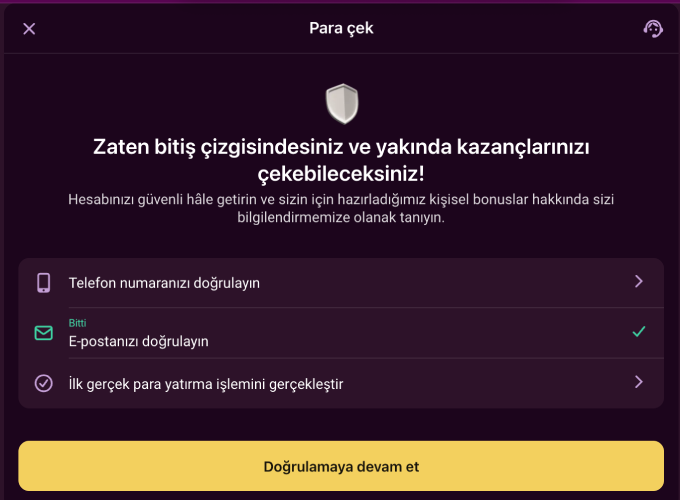
Before your first withdrawal request, three steps need to be completed on your account. The verification screen shows which ones are still pending.
| Step | What You Do |
|---|---|
| Phone confirmation | Enter the code sent to the number you gave at registration. |
| Email confirmation | Confirm via the link or code sent to your registered email. |
| First real-money deposit | Make at least one deposit using real balance, not bonus balance. |
Complete these three steps during account verification. A withdrawal request cannot be created while any step is missing. If one is still pending, the account panel points you to a "continue verification" option. Once verification is complete, your account opens up to withdrawal requests, and every later request runs through the same screen. The withdrawal screen also shows a message noting you are close to the final step and encouraging you to secure your account; you tap "Continue verification" to proceed.
Identity Verification Documents
An identity document may be requested to protect your account and complete your withdrawal request. This check runs through a separate, third-party verification service and forms part of the approval process for your withdrawal. Accepted document types are:
- ID card
- Passport
- Driver's licence
You can upload the document from a computer, or continue from your phone and photograph it with your camera. This step applies to both bank-transfer and crypto withdrawals. After you pick the document type, you submit the file; the review is carried out by our platform. Document upload is managed from the same account panel as your withdrawal request.
Accessing Your Account on Mobile
You can create a withdrawal request from a mobile device just as you would on desktop. There is no official Google Play or App Store listing; access instead runs through one of two routes depending on your device:
- Android: scan the QR code to download the app as an APK file. Open the file, grant installation permission, tap "Install", then open the app once setup finishes and log in.
- iOS: open the site in Safari, tap the "Share" icon at the bottom, choose "Add to Home Screen", then confirm with "Add". The site icon is added to your home screen.
Once you're logged in, the steps match desktop exactly — verification and payment-method selection work the same way on mobile. If you would rather not install the app, you can also log in directly from your phone's browser. The Android app file is roughly 43 MB.
Security Note
Your account is for your use only. Only one account may be opened per user, which also rules out running transactions across multiple accounts. Transfers between different user accounts are not permitted, and accepting funds from third parties is not supported either. Your winnings return to the same account or wallet you deposited from — this rule keeps your account and your transactions secure. Our services are available only to users aged 18 and over, a condition you confirm when opening an account. The full account and transaction terms are available via the checkbox link on the registration form.
Security Logging on Your Account
Our system records the IP address of the device connecting to your account. Your browser information is logged automatically as well. These records exist to protect your account's security, and your withdrawal requests go through this same security check. Logging in from a different device is also recorded in the same way.
Closing Your Account and Pending Payouts
If you want to close your account, you can request this once every 90 days. You notify us from your registered email, then confirm on the site. Your account is blocked only after your final payouts are made, so withdrawal requests you created before the closure request keep being processed. This option exists for users who want to keep their play under control. A new request needs at least 30 days from the previous one — you cannot submit another closure request within that 30-day window. Reopening the account is subject to our review, and we reserve the right to decline that request.
FAQ
Which method is used for my withdrawal?
The same one you used to deposit — bank transfer withdrawals go to your bank account, crypto withdrawals go to your crypto wallet.
What do I need before my first withdrawal?
Your phone number and email must be confirmed, and you must have made at least one real-money deposit.
Where can I check my request status?
Every withdrawal request you create shows its current status in your account panel.
Do I need to upload an ID document before withdrawing?
An identity document may be requested to protect your account. This can be an ID card, a passport, or a driver's licence, and you can upload it from a computer or continue from your phone.
How long does a withdrawal take?
Processing time depends on the method. Crypto withdrawals are processed instantly, while bank-transfer withdrawals depend on the payment provider involved.
Which cryptocurrencies can I withdraw with?
You can withdraw with TRON, USDT (TRC20 and ERC20), Bitcoin, Ethereum, Litecoin, USDC, and Binance Pay. The crypto method you deposited with also applies to your withdrawal.